Every ecommerce store is, secretly, a small country with citizens who leave without explaining why. Your dashboard will tell you, very confidently, that four hundred people abandoned their carts. It will not tell you that half got scared off by shipping costs and the other half just got distracted.
Analytics data can be an excellent liar: it never actually lies; it just tells you a fact and lets you assume the rest. It will show you exactly where someone gave up, but never what they were thinking. For that, shockingly, you have to ask a human being.
This guide covers the methods, the tools worth having, a closer look at the one most stores skip (just asking), and a map for matching your problem to the right one.
TL;DR
- Behavioral data tells you what customers do. Interviews and open-ended surveys tell you why.
- No method works for every problem, so match the method to the problem.
- Interviews are the only way to reliably uncover motivation, reasons for hesitation, and gaps in expectations.
- AI voice interviews solve the scaling problem by automatically initiating interviews at cart abandonment, post-purchase, at returns, and at churn.
What Different Research Methods Tell You
Before you go and pick a method, it helps to know what each one is actually good for and what you're still left in the dark about. The table below sets out exactly what you get from each one and what you're still left guessing about.
The comparison table above illustrates the fundamental trade-off: the deeper the method, the fewer people it will reach. Analytics will cover every single visitor but will only scratch the surface. A single interview, on the other hand, goes deep with one person. That's why we're going to look at interviews in more detail later in this guide.
6 Customer Research Methods for Ecommerce Brands
Ecommerce customer research comes down to two things: what do people do and why do they do it? The six methods that actually matter are set out below with the key questions that each one answers best.
Method 1. Web Analytics & Funnel Analysis
What it is: tracking how the customer moves through your site and where they stop.
What it helps you learn: conversion rates by step, drop-off points, and performance by traffic source, device, and channel.
When to use it (specific ecommerce moments):
- Cart abandonment - pinpointing the exact step (cart, shipping info, payment) where mobile or desktop users drop off
- Post-purchase - tracking whether customers return to browse or repurchase within a given window
- Returns - mapping drop-off within the return-request flow itself, separate from the product return rate
- Churn - spotting a drop in visit frequency early enough to reach a customer before they stop paying attention
Cart abandonment shows why funnel analysis matters. Baymard Institute, which combines dozens of published studies, puts the average online cart abandonment rate at just over 70 percent, and that figure has barely moved in years.
Ecommerce example:
- Problem: Mobile cart abandonment is 80% (well above desktop on the same site).
- Method: Funnel analytics by device.
- Q: At which step (cart, shipping info, payment) does the mobile drop-off spike?
- Insight: The biggest drop occurs the moment the shipping cost is added at checkout rather than at any point earlier in the process.
- Action: Test surfacing the shipping cost earlier in the funnel or introduce a free shipping threshold.
Main limitation: It tells you where the customers are dropping off, not why.
Method 2. Heatmaps & Session Recordings
What it is: visual tracking of clicks, scrolls, and mouse movement on the individual page.
What it helps you learn: which elements grab the attention and where users hesitate, scroll past, or rage-click.
When to use it (specific ecommerce moments):
- Cart abandonment - watching sessions on the cart and checkout pages for hesitation right before someone leaves
- Post-purchase - recording the order confirmation or account page to see if customers linger or look confused after buying.
- Returns - recording the return-request flow itself to catch friction that's independent of the return reason
- Churn - looking at the last few sessions prior to a customer going inactive, trying to identify the moment things went seriously wrong.
Ecommerce example:
- Problem: The page for the best-selling product is getting massive traffic but is converting very poorly.
- Method: Session recordings on that particular page.
- Q: Where do users hesitate, re-click, or rage-click?
- Insight: Users will keep clicking on a static product image (expecting it to zoom), and when it doesn't, they simply walk away without ever seeing the product.
- Action: Add pinch-to-zoom and click-to-zoom to the main product image.
Main limitation: it exhibits behavior patterns rather than the reasoning behind them.
Method 3. On-Site Surveys (Open & Closed-Ended)
What it is: short surveys fired off at particular moments on the site: exit intent, post-purchase, mid-browse.
What it helps you learn is quick reactions from a large sample. Closed questions give you a score; open questions give you some of the reasoning.
When to use it (specific ecommerce moments):
- Cart abandonment - a popup on the cart or checkout page asking 'What almost stopped you from completing your order?'
- Post-purchase - a one-question pulse check on the confirmation page whilst the experience is still fresh. It's quick, but it's not going to give you the depth of insight you get when your ecommerce teams use AI to gather post-purchase feedback.
- Returns - a short survey attached to the return-request form, asking the reason in the customer's own words
- Churn - a single question in the cancellation email or a single question dropped into a win-back email. That's usually the only realistic chance of getting a reply from a churned customer.
Survey response rates continue to decline. Pew Research Center's own telephone survey response rates declined from 36% in 1997 to 6% in 2018. The channel is different, of course, but the same exhaustion is evident in on-site surveys where the vast majority of people give the shortest answer possible.
Ecommerce example:
- Problem: A high-traffic landing page has a great click-through rate to the product pages but a very poor add-to-cart rate.
- Method: On-page micro-survey triggered after 20 seconds of no add-to-cart.
- Q: Why aren't you adding that to your cart at the moment?
- Insight: Many of the respondents didn't know whether it ships to their country.
- Action: Add shipping availability info directly on the product card before checkout.
Main limitation: most answers are only a few words long, and you can't ask a follow-up.
Method 4. Reviews, Ratings & Support Tickets
What it is: identifying the themes that keep cropping up in the existing product reviews, star ratings, and support tickets/chat logs.
What it helps you learn: recurring praise, recurring complaints, and unmet expectations at scale (i.e., the patterns that customers will happily volunteer for you in spades).
When to use it (specific ecommerce moments):
- Cart abandonment - scan reviews to see what doubts buyers had before purchase (shipping cost, delivery time, trust, etc.), as the same doubts are likely to deter other people from buying as well.
- Post-purchase - reviews written in the days right after delivery are the clearest record of expectation-vs-reality gaps.
- Returns - reviews on high-return SKUs usually name the exact reason before the return data catches up
- Churn - a drop in review volume or sentiment for a repeat purchase category can be an early warning of disengagement.
Support tickets and live chat logs are often the richest free source of 'why' data that you can get. Reviews are from people who have completed a purchase. Tickets are from people who got stuck in the middle of the process; they'll ask if an item ships to their country, what size they should pick, why their discount code didn't work, etc.
If you tag your tickets by reason for a few weeks, you'll quickly identify the most common questions, and those will tell you exactly what your product pages and checkout aren't answering.
The NRF and Appriss Retail Returns Report shows that 17.6% of U.S. merchandise purchased online in 2023 was returned, compared to about 10% of merchandise purchased in-store. Catching the expectation gap in reviews before it becomes a return is a real cost saver.
Ecommerce example:
- Problem: A bestseller has a 22% return rate, which is above the category average.
- Method: Review analysis across that SKU's full review history.
- Q: What do the reviewers say about the fit, the sizing, and the accuracy of the photos?
- Insight: 'Runs small' comes up over and over again in the reviews for this SKU.
- Action: Update the size chart and add a 'runs small' note to the listing itself.
Main limitation: the reviews are overwhelmingly from people with strong views, and you can't ask the reviewer what they meant. The tickets only capture people motivated enough to write in.
Method 5. Customer Interviews (Human or AI)
What it is: open-ended conversations with the customer around a specific experience or decision.
What it helps you learn: why customers behave the way they do. The methods described above only reveal the symptoms, e.g., a drop-off, a click pattern, a star rating, a one-line survey answer. None of them will tell you whether two customers who did the same thing did it for the same reason. Only a customer interview can.
A customer who abandons their cart because of shipping costs is exactly the same as one who was comparing prices in terms of analytics, heatmaps, and survey data. Fixing one has no impact on the other, and it's a five-minute conversation that will tell you which is which.
When to use it (specific ecommerce moments):
- Cart abandonment - immediately after a cart has been abandoned, ask "What almost stopped you from completing your order?" This allows you to identify whether it was a pricing issue, a shipping issue, or simply that they were browsing.
- Post-purchase - a few days after delivery, ask "How does this compare with what you expected?" This picks up the gap between expectation and reality while the experience is still fresh, before it becomes a review or a return.
- Returns - the instant a return's been initiated, ask "Was this about the product, or was it something to do with the experience of the product?" That tells you whether you're looking at a product issue or a listing issue.
- Churn - after a period of inactivity or at cancellation, ask "Right when did you decide you were going to stop shopping with us?" That's usually the hardest insight to get any other way, because once the customer goes inactive, there are no carts, sessions, or tickets to look at.
Human interviews have always had one problem: they don't scale. You've got someone who has to schedule them, sit through them, and take the notes. That's fine for a few customers; it's not really viable at the volume of traffic an e-commerce site will see in a week.
An AI customer interviewer such as Frank enables teams to scale the process. Frank conducts open-ended interviews, asks appropriate follow-up questions based on the customer's answers, and then produces an automated conversation summary.
It's available in over 30 languages and can be embedded into a website experience via its interview widget.
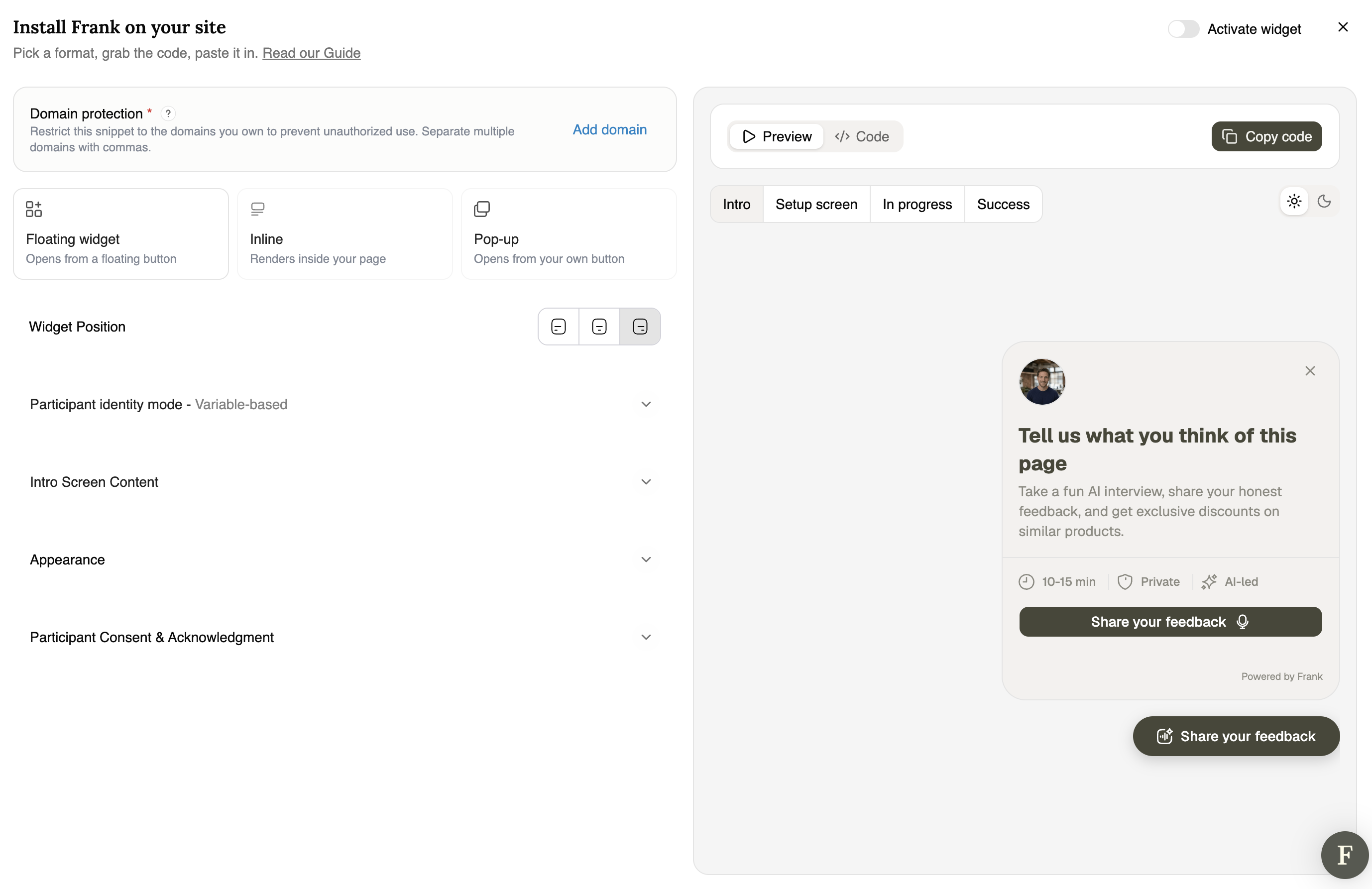
Teams can use AI interviews alongside analytics, surveys, and reviews to explore customer behavior and spot emerging themes.
Ecommerce example:
Problem: The exit-intent survey on the checkout page still comes back with 'too expensive' as the answer. We've tried deeper discounts, but the abandonment rate hasn't budged.
Method: AI voice interviews run by Frank, kicked off immediately after a cart is abandoned.
Q: 'What nearly put you off completing your order?' with adaptive probing into exactly what 'too expensive' meant.
Insight: “Price” turned out to cover four separate problems:
- shipping costs that only appeared at the final step
- a total that looked higher than a competitor’s once delivery was added
- uncertainty about whether returns were free
- shoppers who were comparing prices and never planned to buy that day
Only one of those was actually about the product price. The survey answer was correct, but it masked four separate issues, each requiring a different solution.
Action: Show shipping costs on the product page, have the returns policy adjacent to the checkout button, and send comparison shoppers a reminder flow rather than another discount.
Main limitation: the answers are only as sharp as the timing. An interview triggered days after the event will be full of vague, rationalized explanations, whereas one done straight away will be far sharper.
Method 6. Usability Testing
What it is: watching real users go through the process of carrying out a specific task on your site (e.g., finding and buying a product) rather than asking them what they would do.
What it helps you learn: where the UX actually breaks, irrespective of what the users say.
When to use it (specific ecommerce moments):
- Cart abandonment - testing the checkout process: can a new user go through it without getting confused?
- Post-purchase - task testing order tracking or account management where confusion shows up as support tickets rather than a clear drop-off.
- Returns - task-testing the return-initiation flow, since a confusing process can itself drive dissatisfaction independent of the product
- Churn - test re-engagement flows (e.g., a loyalty program sign-up or a win-back offer) to see if the friction is in the offer itself or in the UX around it.
Ecommerce example:
- Problem: A store found their checkout conversion had dropped after a redesign, even though the new flow performed very well in internal tests.
- Method: Usability testing with a small number of real customers going through the checkout process.
- Q: Where does the task actually fall apart?
- Insight: The new flow requires shoppers to create an account before they can pay. Internal testers were already logged in, so they never saw that screen, but real shoppers do get to that point and then hang on it and leave.
- Action: Add a guest checkout option and allow account creation after the order has been placed.
- Main limitation: the samples are small, and people behave quite differently when they know they're being watched doing a set task.
Which Customer Research Method for Which Ecommerce Problem
Order is important when you're combining methods. Start with the cheaper always-on data to home in on the area of the problem, then use your interview time only in that area. No amount of great customer research platform can change that order.
Best Customer Research Tools for Ecommerce Stores
- Analytics
What the category is for: understanding the actions that the customer takes as they progress through the funnel.
- Google Analytics 4 - tracks traffic, conversion paths, and funnel drop-off across your entire site, free for most e-commerce volumes.
- Shopify Analytics - built-in reporting on sales, conversion rate, and cart behavior for stores already on Shopify
- Mixpanel - event-based tracking for teams that want to follow individual user actions (not just page views) through the funnel
2. Heatmaps & Session Recordings
What the category is for: on-page behavior and friction.
- Hotjar - heatmaps, scroll maps, and session recordings on individual pages, plus lightweight on-site surveys
- Microsoft Clarity - free session recordings and heatmaps with rage-click and dead-click detection
- Lucky Orange - session recordings paired with live chat and a basic funnel visualizer in one dashboard
3. Surveys
What the category is for: to collect structured feedback at scale (either on site or by email).
- Typeform - conversational, one-question-at-a-time surveys built for higher completion rates than a standard form
- Qualtrics - enterprise-grade survey platform for larger, more structured research programs
- Hotjar Surveys - the on-site micro-surveys that get triggered at a particular point in time (exit intent, post-purchase, etc.), all built into the same tool as the heatmaps.
4. Reviews, Ratings & Support Tickets
What the category is for: collecting and analyzing reviews and ratings at scale.
- Yotpo - review collection plus AI-generated theme summaries across large review volumes
- Okendo - reviews and on-site UGC display, with segmentation by customer attributes
- Judge.me - straightforward review collection and display, popular with smaller Shopify stores
- Your helpdesk (e.g., Gorgias or Zendesk) - tag the tickets by reason so that the recurring questions and complaints are surfaced as patterns rather than as individual conversations.
5. Usability & A/B Testing
What the category is for: testing specific flows or page variants with real users.
- Optimizely - enterprise A/B and multivariate testing with strong statistical rigor
- VWO - A/B testing plus heatmaps and session replay in one platform, aimed at mid-size ecommerce teams
- UserTesting - recruits real users to complete tasks on your site while narrating their thinking, for direct usability feedback.
6. Customer Interviews (Human or AI)
What the category is for: direct, open-ended conversations that explain the 'why' of the behavior.
- Frank - an AI voice interviewer that kicks off conversations automatically at key moments in the ecommerce journey and runs them end to end. It's run thousands of interviews across well over 600 research projects.
- UserInterviews - recruits and schedules real customers for human-moderated interviews from a large participant panel
- Respondent.io - a pool of pre-screened participants for one-off qualitative studies, used for both consumer and B2B research
Conclusion
Where to begin? Open your funnel report and find the one step at which the most shoppers are dropping off. Talk to 10-20 of the people who dropped off at that step (ideally within a day), and you'll very quickly start to see the same few reasons emerging. Fix the most common one, watch the funnel for a few weeks, and then move on to the next step.
Once that loop is working, then add the interviews at the other touchpoints covered in this guide: after delivery, at returns, and at cancellation. The AI interviewers (e.g., Frank) will take care of the tricky bit, as they can kick off the conversation automatically the moment a shopper abandons their cart or cancels.

FAQ
What customer research method is best at reducing cart abandonment?
No method will fix it. Use funnel analytics to find the step that has the biggest drop-off and then add an exit-intent question or a post-abandonment interview at that point. The usual suspects are surprise shipping costs, forced account creation, and a confusing return policy, so those are the ones to look at first.
What's the difference between customer interview data and analytics/heatmaps?
Analytics and heatmaps record every visitor automatically, so they're useful for spotting patterns and measuring change. Interview data comes from far fewer people but gives you their rationale, their thinking, their doubts, and their comparisons with the competition. Use the behavioral data to decide who to interview and the interviews to decide what to change.
Can a small store do useful customer research?
Yes. Reviews, support logs, and heatmaps all work with the traffic you already have. You don't need a huge amount of customer interviews to get to the real patterns (a small number is usually sufficient), and then you can validate those patterns against your data at scale.
Should I use a survey or an interview?
Use a survey when you need a straightforward answer from a large number of people. Use an interview when the answer is likely to be complex, ambiguous, or personal.
How often should an ecommerce brand do customer research?
Keep the analytics, the reviews, and the support logs all running at all times, as that's free. Interviews and usability testing work best as a regular part of the process at a particular point in time, rather than as a one-off project, because you only start to see patterns over time.
Does Frank give the same interview to every customer?
No, Frank tailors the conversation to the customer's answers rather than going down a predetermined script. If the customer talks about high shipping costs, Frank will ask further questions to probe that. If they mention a competitor, Frank will ask what they found with that competitor and how it compared. The conversation is driven by the customer's responses, and the aim is to work out why they've had the experiences they have and why they've made the decisions they have.
What is the difference between an AI interviewer like Frank and conventional customer interviews?
Both ask open questions and follow up. The difference is volume: a person runs a few interviews a week; Frank runs hundreds at once, in more than 30 languages, with a summary for each one.